
- Afghanistan 93 / 00
- Albania 355 / 00
- Algeria 213 / 00
- American Samoa 684 / 00
- Andorra 376 / 00
- Angola 244 / 00
- Anguilla 264 / 011
- Antarctica 672 /
- Antigua and Barbuda 268 / 011
- Argentina 54 / 00
- Armenia 374 / 00
- Aruba 297 / 00
- Ascension 247 / 01
- Australia 61 / 0011
- Austria 43 / 00
- Azerbaijan 994 / 810
- Bahamas 242 / 011
- Bahrain 973 / 0
- Bangladesh 880 / 00
- Barbados 246 / 00
- Belarus 375 / 810
- Belgium 32 / 00
- Belize 501 / 00
- Benin, Republic of 229 / 00
- Bermuda 441 / 011
- Bhutan 975 / 00
- Bolivia 591 / 00
- Bosnia and Herzegovina 387 / 00
- Botswana 267 / 00
- Brazil 55 / 00
- British Virgin Islands 284 / 011
- Brunei 673 / 00
- Bulgaria 359 / 00
- Burkina Faso 226 / 00
- Burundi 257 / 90
- Cambodia 855 / 00
- Cameroon 237 / 00
- Canada 1 / 011
- Cape Verde Islands 238 / 0
- Cascade 1 /
- Cayman Islands 345 / 011
- Central African Rep 236 / 19
- Chad Republic 235 / 15
- Chatham Island, NZ 64 / 00
- Chile 56 / 00
- China 86 / 00
- Christmas Island 61 / 00
- Cocos Islands 61 / 0011
- Colombia 57 / 009
- Comoros 269 / 10
- Congo 242 / 00
- Cook Islands 682 / 00
- Costa Rica 506 / 00
- Cove & John 592 /
- Croatia 385 / 00
- Cuba 53 / 119
- Curacao 599 / 00
- Cyprus 357 / 00
- Czech Republic 420 / 00
- Denmark 45 / 00
- Diego Garcia 246 / 00
- Djibouti 253 / 00
- Dominica 767 / 011
- Dominican Republic 809 / 011
- Easter Island 56 / 00
- Ecuador 593 / 00
- Egypt 20 / 00
- El Salvador 503 / 0014400
- Equitorial Guinea 240 / 00
- Eritrea 291 / 00
- Estonia 372 / 800
- Ethiopia 251 / 00
- Falkland Islands 500 / 0
- Faroe Islands 298 / 009
- Fiji Islands 679 / 05
- Finland 358 / 00-990-994
- France 33 / 00
- French Antilles 596 / 00
- French Guiana 594 / 00
- French Polynesia 689 / 00
- Gabon Republic 241 / 00
- Gambia 220 / 00
- Georgia 995 / 810
- Germany 49 / 00
- Ghana 233 / 00
- Gibraltar 350 / 00
- Greece 30 / 00
- Greenland 299 / 009
- Grenada and Carriacuou 473 / 011
- Grenadin Islands 784 / 011
- Guadeloupe 590 / 00
- Guam 671 / 011
- Guantanamo Bay 5399 / 00
- Guatemala 502 / 0013000
- Guiana 594 / 00
- Guinea, Bissau 245 / 00
- Guinea, Rep 224 / 00
- Guyana 592 / 001
- Haiti 509 / 00
- Honduras 504 / 00
- Hong Kong 852 / 001009
- Hungary 36 / 00
- Iceland 354 / 00
- India 91 / 00
- Indonesia 62 / 001-008
- Inmarsat 0 / 00
- Iran 98 / 00
- Iraq 964 / 00
- Ireland 353 / 00
- Isle of Man 44 / 00
- Israel 972 / 00-012-013
- Italy 39 / 00
- Ivory Coast 225 / 00
- Jamaica 876 / 011
- Japan 81 / 0010041
- Jordan 962 / 00
- Kazakhstan 7 / 810
- Kenya 254 / 000
- Kiribati 686 / 00
- Korea, North 850 /
- Korea, South 82 / 001002
- Kosovo 381 / 99
- Kuwait 965 / 00
- Kyrgyzstan 996 / 810
- Laos 856 / 14
- Latvia 371 / 00
- Lebanon 961 / 00
- Lesotho 266 / 00
- Liberia 231 / 00
- Libya 218 / 00
- Liechtenstein 423 / 00
- Lithuania 370 / 810
- Luxembourg 352 / 00
- Macau 853 / 00
- Macedonia, FYROM 389 / 00
- Madagascar 261 / 00
- Malawi 265 / 101
- Malaysia 60 / 00
- Maldives 960 / 00
- Mali Republic 223 / 00
- Malta 356 / 00
- Mariana Islands 670 / 011
- Marshall Islands 692 / 011
- Martinique 596 / 00
- Mauritania 222 / 00
- Mauritius 230 / 00
- Mayotte Island 269 / 10
- Mexico 52 / 00
- Micronesia, Fed States 691 / 011
- Midway Islands 808 / 00
- Miquelon 508 / 00
- Moldova 373 / 810
- Monaco 377 / 00
- Mongolia 976 / 00
- Montserrat 664 / 011
- Morocco 212 / 00
- Mozambique 258 / 00
- Myanmar 95 / 0
- Namibia 264 / 09
- Nauru 674 / 00
- Nepal 977 / 00
- Neth. Antilles 599 / 00
- Netherlands 31 / 00
- Nevis 869 / 011
- New Caledonia 687 / 00
- New Zealand 64 /
- Nicaragua 505 / 00
- Niger Republic 227 / 00
- Nigeria 234 / 009
- Niue 683 / 00
- Norfolk Island 672 / 011
- Norway 47 / 00
- Oman 968 / 00
- Pakistan 92 / 00
- Palau 680 / 011
- Panama 507 / 0
- Papua New Guinea 675 / 05
- Paraguay 595 / 00
- Peru 51 / 00
- Philippines 63 / 00
- Poland 48 / 0
- Port of Spain 1 /
- Portugal 351 / 00
- Principe 239 / 00
- Puerto Rico 787 / 011
- Qatar 974 / 0
- Reunion Island 262 / 00
- Rijeka 385 /
- Romania 40 / 00
- Russia 7 / 810
- Rwanda 250 / 00
- Saipan Airport 1 /
- Saipan 670 / 011
- San Marino 378 / 00
- Sao Tome 239 / 00
- Saudi Arabia 966 / 00
- Senegal Republic 221 / 00
- Serbia, Republic of 381 / 9900
- Seychelles 248 / 00
- Sierra Leone 232 / 00
- Singapore 65 / 001-002-
- Slovakia 421 / 00
- Slovenia 386 / 00
- Solomon Islands 677 / 00
- Somalia Republic 252 / 19
- South Africa 27 / 00
- Spain 34 / 00
- Sri Lanka 94 / 00
- St. Helena 290 / 01
- St. Kitts 869 / 011
- St. Lucia 758 / 011
- St. Pierre et Miquelon 508 / 00
- St. Vincent 784 / 011
- Sudan 249 / 00
- Suriname 597 / 00
- Swaziland 268 / 00
- Sweden 46 / 00
- Switzerland 41 / 00
- Syria 963 / 00
- Taiwan 886 / 002
- Tajikistan 992 / 810
- Tanzania 255 / 000
- Thailand 66 / 001
- Togo 228 / 00
- Tokelau 690 / 00
- Tonga 676 / 00
- Trinidad and Tobago 868 / 011
- Tunapa 1 /
- Tunisia 216 / 00
- Turkey 90 / 00
- Turkmenistan 993 / 810
- Turks and Caicos Islands 649 / 011
- Tuvalu 688 / 00
- Uganda 256 / 000
- Ukraine 380 / 810
- United Arab Emirates 971 / 00
- United Kingdom 44 / 00
- United States 1 / 011
- Uruguay 598 / 00
- US Virgin Islands 340 / 011
- Uzbekistan 998 / 810
- Vanuatu 678 / 00
- Vatican city 39 / 00
- Venezuela 58 / 00
- Vietnam, Soc Republic of 84 / 00
- Wake Island 808 / 00
- Wallis and Futuna Islands 681 / 19
- Western Samoa 685 / 0
- Yemen 967 / 00
- Yugoslavia 381 / 99
- Zaire 243 / 00
- Zambia 260 / 00
- Zanzibar 259255 / 00
- Zimbabwe 263 / 00

The folder you’re interested in, mostly, is our deploy folder, because that’s where you’ll find the SWF file and everything it needs to work.
- Copy or upload the deploy folder in the same folder your HTML webpage is.
- Open the index.html file you’ll find in the deploy folder. Every Flabell component has one. Just open it with your favorite HTML editor. If you don’t have one, use a text editor like Notepad.
- Copy everything between the <body> HTML tags. See the body tag highlighted in the following image.

- Paste the copied code in your HTML page, the one you want the component to be displayed in. Where exactly? Well, in the <div> or <table> you want the component to appear. I’m going to give you an example. Let’s say you have a big “wrapper” div that contains other three divs called “header”, “content”, “footer” and you want the component to be displayed in the “content” area.
- Just paste the copied code under these HTML tags: <div id=”content”></div>.
- Adjust the paths to the files in the code you have copied. They have to be correct, relative to your HTML webpage. So if you copied the deploy folder in the same folder your webpage is, these are the lines you’ll need to adjust:

<script src="js/swfobject.js" type="text/javascript"></script><script type="text/javascript" src="js/swfmacmousewheel.js"></script>flashvars.pathToFiles = "banner/"; swfobject.embedSWF("preview.swf"+cacheBuster, attributes.id, stageW, stageH, "9.0.124", "js/expressInstall.swf", flashvars, params, attributes);
will become
<script src="deploy/js/swfobject.js" type="text/javascript"></script> <script src="deploy/js/swfmacmousewheel.js" type="text/javascript"></script>flashvars.pathToFiles = "deploy/banner/"; swfobject.embedSWF("deploy/preview.swf"+cacheBuster, attributes.id, stageW, stageH, "9.0.124", "deploy/js/expressInstall.swf", flashvars, params, attributes);
Important Note!
You may notice other flashvars that contain paths to files (they may be named xmlPath or contentPath). They usually point to an XML file that contain the content or settings for the component. Those paths should be relative to the pathToFiles flashvar. Also, if any of those XML files contain other paths, they should be relative to the pathToFiles flashvar too.
The <table> HTML element we used is for displaying the component centered in our index.html webpage. If you don’t need it, just delete that element and leave just the <div> that’s inside that <td> element. It’s important to leave that <div> in the place you want the component to be displayed.

Most of the People wear ethnic or national dress on special occasions or in certain roles or occupations. For example, most Korean men and women have adopted Western-style dress for daily wear, but still wear traditional hanboks on special occasions, like weddings and cultural holidays. Items of Western dress may also appear worn or accessorized in distinctive, non-Western ways.
Usually Indians will Wear :
- Nehru suit
- Achkan
- Dhoti
- Kurta (male)
- Sari (female)
- Shalwar Kameez
- Khara Dupatta
- Makhela Chadar called in Assam for female.

Some times Some websites banned by Government, ISP and may be by your office network administrator.
This Tricks are very useful, if you are using internet particularly in school, college and office.
Follow any of the Below Tricks to Enable or to Access the Websites :
Trick 1: Search the banned website, for example www.example.com in Google and yahoo search engine then open the cached copy of that page to access the website. You can get also cache link of that website, if you search in Google with keyword cache:URL name and get cache link to access the website.
Trick 2: Another method to access the banned website using its IP address, because you can open the website with IP address instead of actual URL name. This Trick bypasses the URL based restrictions. For example if www.example.com is banned in your school, you can open it using IP address 216.178.32.51. You can search online IP conversion tools to get IP address of any website.
Trick 3: There are some mini web browsers can help you to open the banned websites, for example Opera Mini Browser, install it and try to open any banned website. Another Real Player browser can successfully help you to access the banned website. This Real Player browser bypasses the many restrictions of website banned tools.
Trick 4: There any many websites Anonymizer tools are available to fetch the banned website. These anonymous surfing tools that protect your identity on the internet and give the access to banned sites. As far as the service provider is concerned you are viewing a page from Anonymizer and not the blocked site.

Now You can insert the YouTube Videos into your PowerPoint slides to express your idea or better way to communicate something. You can convey these ideas in more effective ways, if you are using movie files with your simple slides.
Follow the given steps to add YouTube Videos into your PowerPoint slides:
First of all download the YouTube.com Videos and then save on your computer hard drive. Mostly movies are available in flash video file format on YouTube site.
You can convert also the downloaded Videos from YouTube into any common format, for example, windows media video file (wmv), windows video file (avi) and movie file (mpeg).
Tip : You can Use the KeepVid Program to Download the Youtube Videos.
First of all open the presentation in which you want to insert movie file.
Now click on "Movies and Sounds" option from the Insert" menu and choose the option "Movie from File".

Now select your movie that you want to insert into slide and click on Ok button.

Here now you are asked "Do you want your movie to play automatically in the slide show? If not, it will play when you click it."

Recommend choosing Ok button to play automatically even if you want the movie to play when clicked.
Finally save your PowerPoint presentation and run it for test.
Usually you may be Spending Your Maximum time daily with internet browsing.
You can increase your browsing speed and can handle many online browsing restrictions very easily.
Common Internet Explorer(IE) Browser Shortcut Keys :
- Press F5 to refreshes the webpage.
- Press Backspace button back to the previous page.
- Press Alt+Home button same time to go home page of the website.
- Press any time Ctrl+N to open the new browser windows.
- Press F11 key to view any webpage in full-screen view and then again press for normal view.
- Press Ctrl+P keys to send the print command for current whole page.
- Press Ctrl+H keys to view your browsing history.
- Press Ctrl+w keys to close the current browser window.
- Press Esc button to stop any page browsing.
Configure Hotmail, GMail and Live Email Accounts to MS Outlook 2010
Microsoft has been claiming that it will improve its Hotmail service, making it a better webmail provider. Nevertheless, new version of Outlook, i.e. Outlook 2010 is already out. This article will instruct you on how to incorporate Outlook and Hotmail.Outlook 2010 is compatible with many email systems, such as POP3, IMAP and Exchange accounts. Exchange syncs your calendar and contacts as well as your email but POP3 and IMAP does not do so. If you use the Hotmail Connector you will be enabled to sync your email, contacts and calendar with Outlook . This will make it easy to access your PIM data anywhere you are.
The procedure involves 8 easy steps:
1. In order to incorporate Hotmail into Outlook you need to first install the Hotmail connector. Before doing so, ensure that Outlook is not being used and it has been closed. Then go ahead with the installation.
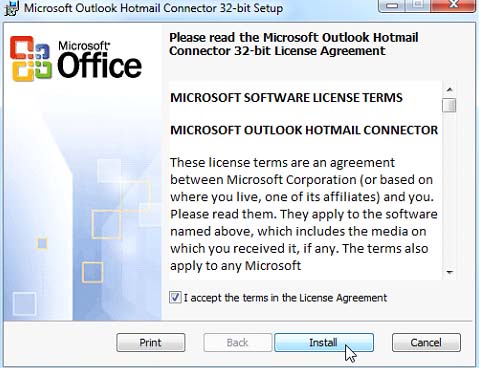
2. Outlook will prompt you to download Hotmail Connector if you enter your hotmail account in the New Account Setup. If you haven’t already exited Outlook you will have to do so and enter your information again when you restart Outlook, thus it is better to install Hotmail Connector first.
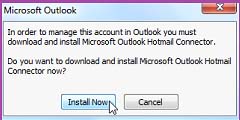
3. The actual process will start at this point. If you are running Outlook 2010 for the first time, the screen given below will appear. Click the Next to continue setting up Outlook.
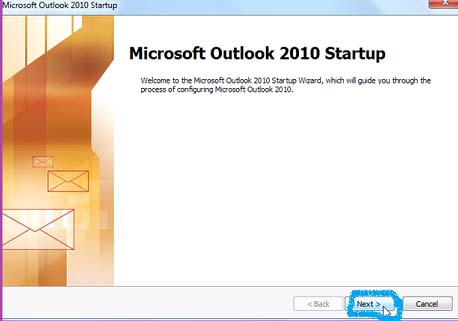
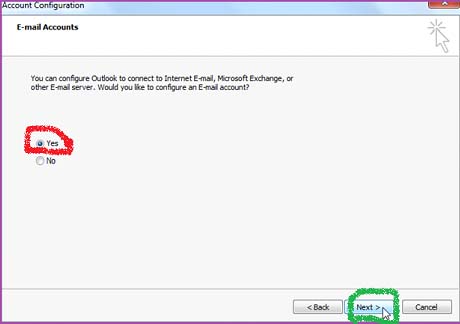
4. When you have pressed next, you will be asked for confirmation. Select Yes and then Next for the second time.
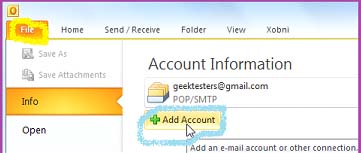
5. If you have been using Outlook, just add a new account by pressing the File button and then clicking the Add Account button.
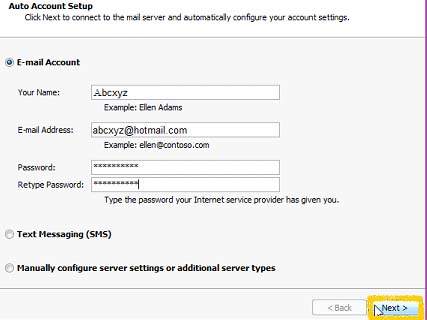
6. After you have selected the required button, enter the information related to your Hotmail account and once again press Next.
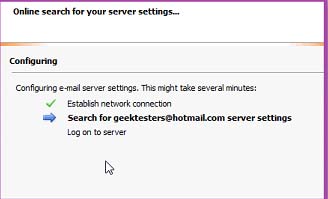
7. Outlook will generate a search for your account settings and then it will automatically setup the account with Hotmail Connector which has already been installed.
8. Once all of the steps listed above have been completed, the following screen will popup. Just press the Finish button, setup has been completed and you can check your Hotmail in Outlook.
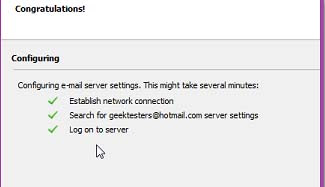
Setup has been completed so now you have officially synced your Hotmail account with Outlook 2010. You will receive a notification at the bottom of your window stating that you are connected Windows Live Hotmail. Your email will be coordinated with your Hotmail account, vice versa your calendar and contacts saved on Outlook will be synchronized with your Live calendar and contacts. This procedure will ensure setting up an optimum full Exchange without actually getting an Exchange account. As a matter of fact, Hotmail Sync seems to be faster than IMAP synchronization.
Hotmail generally isn’t as popular as Gmail but it works really well with Outlook integration. If you frequently use Window Live services, or want to give them a go then Outlook Connector is the best option to keep the cloud synced with your desktop. Or maybe you are just like many other Hotmail users who want to access Hotmail with their other email accounts, this is a useful procedure for you too.
This article will teach you explain to you how you can convert your Power Point 2010 presentation to a video, using below steps.
It is useful to convert your PowerPoint presentations to video because this way more people will be able to view it as it will allow without PowerPoint software to watch it as a video.
Follow these 7 steps:
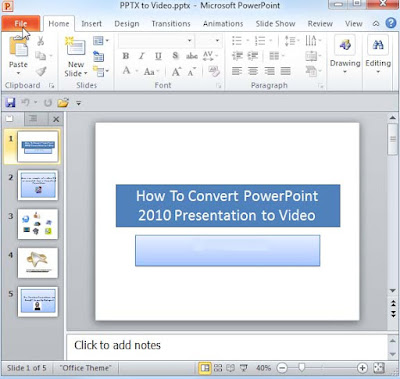
1. The first thing that you need to do is, select Backstage View from the File drop down menu.
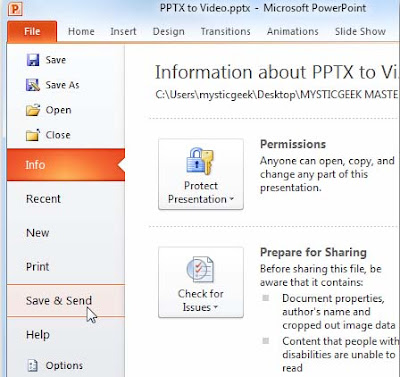
2. After you have opened the Backstage View, press the Select and Send option.
3. Once you have pressed the Send &Save button a number of options will be displayed in the File Types menu, select Create a video.
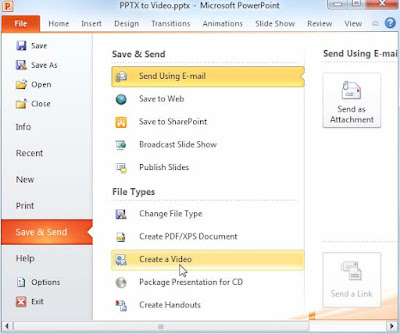
4. Once you have chosen to create the video, you need to select some other options such as the size of the file, recorded narrations and set the number of minutes which should elapse between slides and then press the Create a Video option.
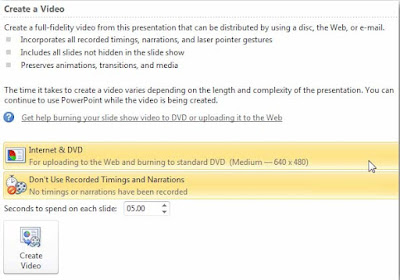
5. Now that you have accommodated the view to your liking, all you have to do is designate a location for your video. In a corporate situation, it is always better to put it on a shared network drive.
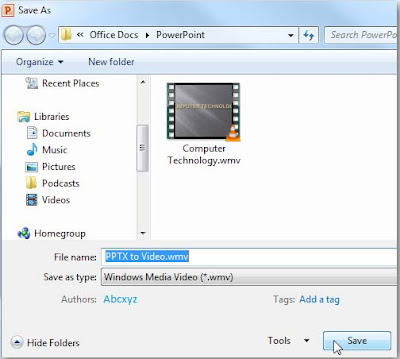
6. Now, that you have saved your video in your desired location, your file will start converting to the .wmv format. A progress bar will appear in the lower right corner of the PowerPoint presentation.
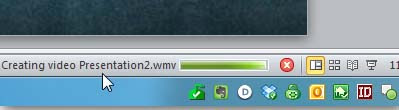
7. As all of the steps have been completed just turn on your .wmv compatible player and view your video.
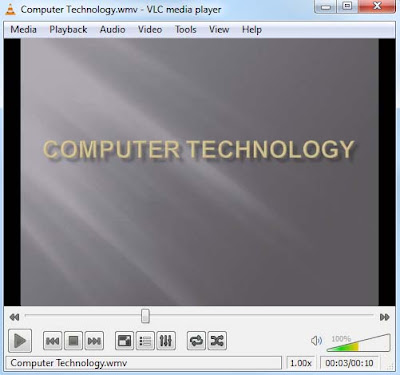
Other options to add to your PowerPoint presentation are adding transitions to slideshows and animating text and objects . If you edit your video via Windows Live Movie Maker you can upload it to YouTube.
Converting your PowerPoint presentation not only makes your presentations more accessible but it also allows you to watch your video in your desired .wmv player.

India's Best and Top Internet Providers List :
Know more About Communications in India fom Wikipedia.

Get high speed internet access and instant accessibility with DSL (Direct Subscriber Line) technology from airtel broadband.
Click Here to Know more About Airtel Broadband Connection.

Reliance's aim is to provide a never-before internet experience, with this in mind they are constantly reinventing their products with features and services that add value to your life in more ways than one.
Click Here to Know more About Reliance Broadband Connection.

TATA tariff plans are structured keeping your needs in mind. Choose a plan that best fits your requirement. Also enjoy great offers with TATA tariff plans.
Click Here to Know more About Reliance Broadband Connection.
 Idea Broadband Connections in India
Idea is a Product of Aditya Birla Group. IDEA Network Does not Support to Wire Connections and It Works Better on Data Cards and 3G Connections.
Click Here to Know more About Reliance Broadband Connection.

Tikona Digital Networks (TDN) is engaged in building the next generation wireless broadband services for home and enterprise customers in India.
Click Here to Know more About Reliance Broadband Connection.


MediaMax Media Sharing Script | Media Hosting Script Youtube Clone
New Version 3.3 Released
Features :
- HD / SD Video Player Button
- If users upload a HD MP4 or MOV video, the HD/SD button allows users to swap between HD/SD quality
- Full HD Support
- Experience High Definition MP4 and MOV videos with zero quality loss when uploading. Watch true 1080p and 720p videos.
- Original Video Playback
- Our HD Video Player can now playback originally uploaded HD MP4 and MOV videos. Stunning Clarity!
- Optional Player Scaling
- Admins can get whether videos are scaled or not in the Admin Panel.
- New Audio Player!
- A new audio player has been added with auto scrolling related audios and scrolling audio title ticker
- Image Support For Video Advertisements
- You can now use images in addition to videos for pre-roll and post-roll advertisements in the video player
- In-Video Text Advertisements
- Admins can now add category based auto rotating in-video text advertisements that show up while a video is being played. Great for earning additional revenue!
- Ajax Comments Paging
- Video comments, audio comments and member profile comments now have paging support so comments can be limited per page and loaded instantly using ajax.
- E-Mail Alert System
- Member controlled e-mail alerts have been added for video conversion, new video comments, new picture comments, new audio comments, new profile comments, new private messages and new friend requests.
- Tag Clouds - Audios, Pictures and Videos
- Multiple tag clouds for audios, pictures and videos have been added to the homepage which load instantly via ajax.
MediaMAX supports multiple methods of video streaming, allowing you to stream your videos the way you want. Users can click anywhere on the video player and the video will load from there when video streaming is setup.
Lighttpd Streaming - Allows you to stream FLV Videos
Apache mod_flvx video streaming - Allows you to stream FLV Videos
Apache mod_h264 streaming - Allows you to stream HD MP4 Videos
What's New?
- With MediaMAX advanced media sharing script you can not only share videos, but also pictures / photos and audio / music / mp3's
Requirements :
Apache web server with mod_rewrite enabled.
MySQL version 4.0+
Cgi-bin Perl Access
GD Library 2+ with freetype support.
PHP 5.2+ with the following configuration
safe_mode = off
open_basedir = (no value)
output_buffering = on
register_argc_argv = On
max_execution_time = 1000 (Recommended or higher)
session.gc_maxlifetime = 15000 (Recommended or higher)
upload_max_filesize = 100M (Recommended or higher)
post_max_size = 100M (Recommended or higher)
register_globals = off
Mplayer + Mencoder (http://www.mplayerhq.hu/design7/dload.html)
LAME MP3 Encoder (http://lame.sourceforge.net)
Flv2tool (http://inlet-media.de/flvtool2)
Libogg + Libvorbis (http://www.xiph.org/downloads)
FFmpeg (http://ffmpeg.mplayerhq.hu)
Ability to run PHP from the command line (CLI) with exec()
Ability to execute background processes with exec("binary > /dev/null &")
To stream videos, servers are required to have one or more of the following additional server requirements:
Lighttpd Streaming Lighttpd web server with mod_flv_streaming installed.
Apache mod_flvx Video Streaming
Apache web server with mod_flvx installed.
Apache mod_h264 Video Streaming (HD)
Apache web server with mod_h264 installed.
Unlimited Web Hosting Supported for MediaMAX Files Websites :


iDocScript - Document Sharing Script - Powerful Document Sharing Script
New Version 2.0.2 Released
Features :
- iDocScript allows you to upload documents in multiple formats
- include pdf, doc, xls and ppt.
- Multiple Languages Supported
- iDocScript is a multilingual document sharing script.
- The script comes pre-loaded with english, french and spanish language packs.
- Easily add new languages!
Create your own popular document sharing website.
Upload and share documents with everyone.
Embeddable document viewer displays documents right on your website.
What's New?
- Upload Progress Bar
- A new upload progress bar with statistics has been added.
- Automatic Thumbnails
- Thumbnails can now be automatically generated from uploaded pdf files.
- More Document Formats Supported
- Support has been added for more document formats including pdf, ppt, xls and doc
- French Language Pack
- The french language pack has now been added
- Integrated Document Reader
- A new integrated document reader has been added, which allows documents to be viewed directly on the website.
Requirements :
- iDocScript requires a linux server with the following setup:
- Apache web server with mod_rewrite enabled.
- MySQL version 4.0+
- Access to cgi-bin.
- GD Library 2+ with freetype support.
- PHP 5.2+ with the following configuration
- safe_mode = off
- open_basedir = (no value)
- output_buffering = on
- register_argc_argv = On
- max_execution_time = 1000 (Recommended or higher)
- session.gc_maxlifetime = 15000 (Recommended or higher)
- upload_max_filesize = 100M (Recommended or higher)
- post_max_size = 100M (Recommended or higher)
- PHP upload_progress extension (http://pecl.php.net/package/uploadprogress)
- Imagemagick
- Ability to run PHP from the command line (CLI) with exec()
- Ability to execute background processes with exec("binary > /dev/null &")
Web Hosting Supported for iDocScript Website :


Which is Better to buy! Laptop or Desktop?
Choosing between a laptop and desktop can be a difficult decision. The bottom line comes down to portability. If you will need or use the portability of a laptop, then it can be a powerful tool for you and worth the extra money. However, if the laptop will simply act as a desktop with very occasional need for portability, a desktop is also an excellent choice and far less expensive. Laptops have a great advantage in terms of their portability. If you carry a laptop with you, your applications and documents are always immediately available. With a wireless card, your laptop can also access the Internet while on the go, so you have more places to do research, check your email, and be more productive.
Desktops offer other advantages. Although laptop prices have come down and performance has increased, most desktops offer a better price-to-performance ratio. Desktops also still hold some ergonomic advantages over laptops. Bear in mind that, aside from small footprint desktops like the iMac or Inspiron One (available for personal purchase through our online catalog or the Dell Educational Purchase Program), they take up more space in an apartment or residence hall.
Your decision should be based primarily on how you plan to use your computer and the size of your computing budget. Here are some factors to consider:
Weight, size and portability
A typical laptop weighs between 4.5 and 8 pounds, while "ultralight" models like the MacBook Air weigh in at under 3 pounds. Alternatively, the economy and cost-oriented option - the netbook, belonging to the ultralight class - focuses primarily on mobility and are often Windows or Linux-based. Netbooks are most commonly equipped with an Intel Atom - a series of microprocessor that focuses less on performance and more on basic functionality in tandem with low power consumption. Netbooks are often designed with screen sizes between 8'' and 10''. Because of these features, netbooks are therefore best suited for web browsing, e-mail and office tasks and are priced beneath the cost of a typical laptop. The MacBook Air is noted for its thinness and sparse weight and is available in both an 11" and 13" screen sizes depending upon a user's portability needs. The MacBook Air currently utilizes a Core i-Series processor which allow them to better approximate the level of performance of the typical laptop; it is a device geared toward performance and portability rather than budget. Further, these two types of "ultralight" laptops do not have internal CD/DVD drives and are dependent on the internet and removable media to retrieve information.
Your classic desktop computer, including monitor and keyboard, weighs about 25 pounds. If you regularly want access to the contents of your computer whether at home, office or on the road, the portability of a laptop is an important criterion. Alternatively, using a USB flash drive or web-based storage like My WebSpace with copies of your important documents allows for easy on-the-go access (My WebSpace requires an internet connection) and works with any desktop, laptop, Mac, or PC.
Ergonomics
One downside of portability is ergonomics. The laptop's miniature size can make its use less comfortable and physically taxing. The keyboard and trackpad orientation of netbooks can vary significantly; the result of this being the built-in keyboards of the netbook tend to be anywhere between 92% and 95% of the typically laptop keyboard. As manufacturers approach their netbook keyboard and trackpad designs with more variance than with normal laptops and standard keyboards, it is particularly important to type on the netbooks for ergonomic reasons. The desktop computer's design has evolved to ease the comfort of users. Its display is at eye level, and the keyboard allows for proper positioning of your back, arms, and wrists. These are important concerns, especially when you use your computer for long periods of time. You can improve laptop ergonomics by building a more comfortable "home base" into which you can dock your laptop when you return to your desk. A "home base" can include such things as a standard keyboard, a mouse, an external display, etc.
Cost and Reliability
PC desktops are approximately 1/2 the price of a comparable standard laptop. Although overall prices have declined, price gaps still exist largely because of the higher cost of laptop displays and the added cost of miniaturized technology. Since laptops are portable, they are more prone to accidents and abuse than desktops. And due to their size, laptops require smaller, more intricate components and more tedious labor resulting in more costly upgrades and repairs. We recommend that you consider purchasing extended warranties for both laptops and desktops to cover the effective life of the machine.
Connectivity
Both laptops and desktops have equal connectivity to the Internet through the standard technologies including dial-up modems, DSL or Cable modems, Ethernet and Wireless networking. Users can connect using an Ethernet cable in residence hall rooms or by purchasing and setting up a wireless router. Owning a laptop gives users the ability to take advantage of wireless networks like UWNet, which is available in nearly all campus buildings and the common areas (dens, dining halls, etc.) of residence halls.
Theft
A laptop's small size and portability make it vulnerable to theft. Unless you can lock or secure your laptop, you should take it with you wherever you go. Security devices like cable locks and LoJack are available for laptops to deter thieves.
Desktops provide less expensive, more comfortable, powerful performance to meet your computing needs from a fixed location. Laptops provide performance to meet your computing needs from virtually anywhere. Laptops cost roughly one-third more, and for additional comfort you will pay more yet for extra "home base" components. But if you want to take advantage of the portability and increased productivity offered by laptops, then the extra expense may be worth it. If portability and the extended access it provides is not important, then a desktop may make more sense.
The choice is yours. Evaluate and review your computing needs and decide what's best for you.