
- Afghanistan 93 / 00
- Albania 355 / 00
- Algeria 213 / 00
- American Samoa 684 / 00
- Andorra 376 / 00
- Angola 244 / 00
- Anguilla 264 / 011
- Antarctica 672 /
- Antigua and Barbuda 268 / 011
- Argentina 54 / 00
- Armenia 374 / 00
- Aruba 297 / 00
- Ascension 247 / 01
- Australia 61 / 0011
- Austria 43 / 00
- Azerbaijan 994 / 810
- Bahamas 242 / 011
- Bahrain 973 / 0
- Bangladesh 880 / 00
- Barbados 246 / 00
- Belarus 375 / 810
- Belgium 32 / 00
- Belize 501 / 00
- Benin, Republic of 229 / 00
- Bermuda 441 / 011
- Bhutan 975 / 00
- Bolivia 591 / 00
- Bosnia and Herzegovina 387 / 00
- Botswana 267 / 00
- Brazil 55 / 00
- British Virgin Islands 284 / 011
- Brunei 673 / 00
- Bulgaria 359 / 00
- Burkina Faso 226 / 00
- Burundi 257 / 90
- Cambodia 855 / 00
- Cameroon 237 / 00
- Canada 1 / 011
- Cape Verde Islands 238 / 0
- Cascade 1 /
- Cayman Islands 345 / 011
- Central African Rep 236 / 19
- Chad Republic 235 / 15
- Chatham Island, NZ 64 / 00
- Chile 56 / 00
- China 86 / 00
- Christmas Island 61 / 00
- Cocos Islands 61 / 0011
- Colombia 57 / 009
- Comoros 269 / 10
- Congo 242 / 00
- Cook Islands 682 / 00
- Costa Rica 506 / 00
- Cove & John 592 /
- Croatia 385 / 00
- Cuba 53 / 119
- Curacao 599 / 00
- Cyprus 357 / 00
- Czech Republic 420 / 00
- Denmark 45 / 00
- Diego Garcia 246 / 00
- Djibouti 253 / 00
- Dominica 767 / 011
- Dominican Republic 809 / 011
- Easter Island 56 / 00
- Ecuador 593 / 00
- Egypt 20 / 00
- El Salvador 503 / 0014400
- Equitorial Guinea 240 / 00
- Eritrea 291 / 00
- Estonia 372 / 800
- Ethiopia 251 / 00
- Falkland Islands 500 / 0
- Faroe Islands 298 / 009
- Fiji Islands 679 / 05
- Finland 358 / 00-990-994
- France 33 / 00
- French Antilles 596 / 00
- French Guiana 594 / 00
- French Polynesia 689 / 00
- Gabon Republic 241 / 00
- Gambia 220 / 00
- Georgia 995 / 810
- Germany 49 / 00
- Ghana 233 / 00
- Gibraltar 350 / 00
- Greece 30 / 00
- Greenland 299 / 009
- Grenada and Carriacuou 473 / 011
- Grenadin Islands 784 / 011
- Guadeloupe 590 / 00
- Guam 671 / 011
- Guantanamo Bay 5399 / 00
- Guatemala 502 / 0013000
- Guiana 594 / 00
- Guinea, Bissau 245 / 00
- Guinea, Rep 224 / 00
- Guyana 592 / 001
- Haiti 509 / 00
- Honduras 504 / 00
- Hong Kong 852 / 001009
- Hungary 36 / 00
- Iceland 354 / 00
- India 91 / 00
- Indonesia 62 / 001-008
- Inmarsat 0 / 00
- Iran 98 / 00
- Iraq 964 / 00
- Ireland 353 / 00
- Isle of Man 44 / 00
- Israel 972 / 00-012-013
- Italy 39 / 00
- Ivory Coast 225 / 00
- Jamaica 876 / 011
- Japan 81 / 0010041
- Jordan 962 / 00
- Kazakhstan 7 / 810
- Kenya 254 / 000
- Kiribati 686 / 00
- Korea, North 850 /
- Korea, South 82 / 001002
- Kosovo 381 / 99
- Kuwait 965 / 00
- Kyrgyzstan 996 / 810
- Laos 856 / 14
- Latvia 371 / 00
- Lebanon 961 / 00
- Lesotho 266 / 00
- Liberia 231 / 00
- Libya 218 / 00
- Liechtenstein 423 / 00
- Lithuania 370 / 810
- Luxembourg 352 / 00
- Macau 853 / 00
- Macedonia, FYROM 389 / 00
- Madagascar 261 / 00
- Malawi 265 / 101
- Malaysia 60 / 00
- Maldives 960 / 00
- Mali Republic 223 / 00
- Malta 356 / 00
- Mariana Islands 670 / 011
- Marshall Islands 692 / 011
- Martinique 596 / 00
- Mauritania 222 / 00
- Mauritius 230 / 00
- Mayotte Island 269 / 10
- Mexico 52 / 00
- Micronesia, Fed States 691 / 011
- Midway Islands 808 / 00
- Miquelon 508 / 00
- Moldova 373 / 810
- Monaco 377 / 00
- Mongolia 976 / 00
- Montserrat 664 / 011
- Morocco 212 / 00
- Mozambique 258 / 00
- Myanmar 95 / 0
- Namibia 264 / 09
- Nauru 674 / 00
- Nepal 977 / 00
- Neth. Antilles 599 / 00
- Netherlands 31 / 00
- Nevis 869 / 011
- New Caledonia 687 / 00
- New Zealand 64 /
- Nicaragua 505 / 00
- Niger Republic 227 / 00
- Nigeria 234 / 009
- Niue 683 / 00
- Norfolk Island 672 / 011
- Norway 47 / 00
- Oman 968 / 00
- Pakistan 92 / 00
- Palau 680 / 011
- Panama 507 / 0
- Papua New Guinea 675 / 05
- Paraguay 595 / 00
- Peru 51 / 00
- Philippines 63 / 00
- Poland 48 / 0
- Port of Spain 1 /
- Portugal 351 / 00
- Principe 239 / 00
- Puerto Rico 787 / 011
- Qatar 974 / 0
- Reunion Island 262 / 00
- Rijeka 385 /
- Romania 40 / 00
- Russia 7 / 810
- Rwanda 250 / 00
- Saipan Airport 1 /
- Saipan 670 / 011
- San Marino 378 / 00
- Sao Tome 239 / 00
- Saudi Arabia 966 / 00
- Senegal Republic 221 / 00
- Serbia, Republic of 381 / 9900
- Seychelles 248 / 00
- Sierra Leone 232 / 00
- Singapore 65 / 001-002-
- Slovakia 421 / 00
- Slovenia 386 / 00
- Solomon Islands 677 / 00
- Somalia Republic 252 / 19
- South Africa 27 / 00
- Spain 34 / 00
- Sri Lanka 94 / 00
- St. Helena 290 / 01
- St. Kitts 869 / 011
- St. Lucia 758 / 011
- St. Pierre et Miquelon 508 / 00
- St. Vincent 784 / 011
- Sudan 249 / 00
- Suriname 597 / 00
- Swaziland 268 / 00
- Sweden 46 / 00
- Switzerland 41 / 00
- Syria 963 / 00
- Taiwan 886 / 002
- Tajikistan 992 / 810
- Tanzania 255 / 000
- Thailand 66 / 001
- Togo 228 / 00
- Tokelau 690 / 00
- Tonga 676 / 00
- Trinidad and Tobago 868 / 011
- Tunapa 1 /
- Tunisia 216 / 00
- Turkey 90 / 00
- Turkmenistan 993 / 810
- Turks and Caicos Islands 649 / 011
- Tuvalu 688 / 00
- Uganda 256 / 000
- Ukraine 380 / 810
- United Arab Emirates 971 / 00
- United Kingdom 44 / 00
- United States 1 / 011
- Uruguay 598 / 00
- US Virgin Islands 340 / 011
- Uzbekistan 998 / 810
- Vanuatu 678 / 00
- Vatican city 39 / 00
- Venezuela 58 / 00
- Vietnam, Soc Republic of 84 / 00
- Wake Island 808 / 00
- Wallis and Futuna Islands 681 / 19
- Western Samoa 685 / 0
- Yemen 967 / 00
- Yugoslavia 381 / 99
- Zaire 243 / 00
- Zambia 260 / 00
- Zanzibar 259255 / 00
- Zimbabwe 263 / 00

The folder you’re interested in, mostly, is our deploy folder, because that’s where you’ll find the SWF file and everything it needs to work.
- Copy or upload the deploy folder in the same folder your HTML webpage is.
- Open the index.html file you’ll find in the deploy folder. Every Flabell component has one. Just open it with your favorite HTML editor. If you don’t have one, use a text editor like Notepad.
- Copy everything between the <body> HTML tags. See the body tag highlighted in the following image.

- Paste the copied code in your HTML page, the one you want the component to be displayed in. Where exactly? Well, in the <div> or <table> you want the component to appear. I’m going to give you an example. Let’s say you have a big “wrapper” div that contains other three divs called “header”, “content”, “footer” and you want the component to be displayed in the “content” area.
- Just paste the copied code under these HTML tags: <div id=”content”></div>.
- Adjust the paths to the files in the code you have copied. They have to be correct, relative to your HTML webpage. So if you copied the deploy folder in the same folder your webpage is, these are the lines you’ll need to adjust:

<script src="js/swfobject.js" type="text/javascript"></script><script type="text/javascript" src="js/swfmacmousewheel.js"></script>flashvars.pathToFiles = "banner/"; swfobject.embedSWF("preview.swf"+cacheBuster, attributes.id, stageW, stageH, "9.0.124", "js/expressInstall.swf", flashvars, params, attributes);
will become
<script src="deploy/js/swfobject.js" type="text/javascript"></script> <script src="deploy/js/swfmacmousewheel.js" type="text/javascript"></script>flashvars.pathToFiles = "deploy/banner/"; swfobject.embedSWF("deploy/preview.swf"+cacheBuster, attributes.id, stageW, stageH, "9.0.124", "deploy/js/expressInstall.swf", flashvars, params, attributes);
Important Note!
You may notice other flashvars that contain paths to files (they may be named xmlPath or contentPath). They usually point to an XML file that contain the content or settings for the component. Those paths should be relative to the pathToFiles flashvar. Also, if any of those XML files contain other paths, they should be relative to the pathToFiles flashvar too.
The <table> HTML element we used is for displaying the component centered in our index.html webpage. If you don’t need it, just delete that element and leave just the <div> that’s inside that <td> element. It’s important to leave that <div> in the place you want the component to be displayed.

An increasing number of people of all ages own mobile phones, enjoying the convenience, freedom and re-assurance they provide. There is a range of different handsets and contracts available, providing mobile communication solutions to suit Customers.
Below Points may be Useful to you and if you Follow :
- Fix your budget: Before you do anything else, think about why you want a mobile phone and determine your budget. There are numerous types of call plan, to suit various budgets and needs. There are also services available to help you keep track of what you spend consider whether this would help you and check out what options are available.
- What are your usage patterns: How often will you be using the phone, at what time of day and what will be your average call length? Will you be using the phone mostly for voice calls, or to SMS friends? Your usage patterns may help determine what type of plan is best for you and your budget.
- What types of plan are available: There are four basic types of service agreement: fixed-term contracts, monthly plans, pre-paid or leasing. Pre-paid is ideal if you want to ensure you stay within a specified budget - perfect for teenagers. Getting a pre-paid first is also a good way of finding out what your usage is and helping you decide what type of plan might best suit you. Monthly plans allow you the flexibility of receiving monthly bills without signing a long-term contract. Business users may prefer the convenience of fixed-term, while leasing may suit you if you only need a phone and handset for a short time. New capped' plans (available post or pre-paid, depending on mobile carrier) also offer convenience and value and may suit many users.
- What are the call rates within each plan: Call rates vary from plan-to-plan. It's important to assess both the rates and the call charge calculation methods when assessing your options. Issues to consider include: How are call charges calculated? On some plans you will be billed per second, on others, per block of time used (usually per 30 or 60 seconds), or, on the newer capped' deals (post and pre-paid), call caps' apply to many services, providing value and certainty; Is there a flag fall (an amount paid for each connection, in addition to call costs)? Are there any special offers (eg cheaper calls off-peak, or to friends on the same network, or for SMS)?
- What features do you need in a handset: A basic handset will allow you to make calls and send and receive SMS. You'll need a more sophisticated one if you want to use the phone abroad, use MMS, voice recording, make video calls, download video or access the internet. Other features to consider are battery capacity (some handsets run longer between charges than others), ease of use, and your coverage requirements (see coverage'). Consider what you really need or you'll be paying for features you never use. If you already have a handset, are you eligible for other plans?
- How much flexibility do you need: Consider your need for flexibility - and your budget - before you buy a handset or take out a plan. Are you likely to want the flexibility to upgrade your handset when a new one becomes available? Might you want to change to a different plan in six months? There are many different options for paying for handsets (e.g. up-front, flexi-rent deals, as part of your service agreement), and different plans (whether pre-paid or post-paid) have different terms and conditions for example some include penalties for changing networks, or plans, for example. Read the small print and check you can meet all the minimum conditions of the contract before signing anything.
- What coverage do you require: Where will you be using the phone only in metropolitan areas, or in the country? The two dominant types of mobile network are GSM and CDMA. Check with the carriers where they have coverage to ensure they can provide the service where you need it before signing up. Your coverage requirements may also affect your handset choice (there are CDMA and GSM handsets).
- Evaluate the options: Once you've worked out what you need/want, do your homework; shop around and compare what is available, and what will best suit your likely usage and budget.

MP3 players are pocket-sized electronic devices that have the ability to not only store, but play music and other sound files. Although MP3 players are sophisticated devices and there are many verities, they can be placed into one of three broad categories. These categories include hard drive based players, micro hard drive based players, and flash based players.
Hard drive based MP3 players are typically larger and heavier than their competitors due to the fact that they contain a large capacity hard drive inside. This however, may be one of its only weaknesses. These MP3 players provide the largest capacity, ten gigabytes or more, out of the different types of MP3 players. Due to the fact that ten gigabytes equates to roughly 2,900 MP3 files, most consumers buy these players because they accommodate their entire MP3 collection. However, if you are looking for a player to bring with you on a jog or to use at the gym, you may choose to shy away from these players. Any sudden physical movement may cause the internal mechanical hard drive to skip.
Micro hard drive based MP3 players are similar to their big brothers, the hard drive based players, except that they are a bit smaller, both in physical size and internal storage capacity. These MP3 players hold up to six gigabytes of MP3 files, which equals roughly 1,700 songs. Still boasting a respectable capacity, these players have won over many consumers due to their light-weight, compact size. However, these players are also susceptible to skipping if subjected to intense physical movement. Additionally, both hard drive and micro hard drive based players commonly contain rechargeable batteries that can not be replaced for a new battery, but only recharged. If it's small size and moderate capacity that you are in search of this type of player may be just right.
If neither of these players piques your interest, flash based MP3 players may fit your needs. These ultra compact, low capacity players contain no moving parts and consequently, never skip. Another advantage of these players is that their size and lack of moving parts allow them to use minimal power, causing your batteries to last longer. Also, these players almost always use replaceable, disposable batteries, allowing you to put in a new battery if your player should die in the middle of use. However, flash based MP3 players commonly range in capacity from 32 megabytes (roughly 10 songs) to two gigabytes (roughly 570 songs) at most. Therefore, most consumers with a large music collection tend to shy away from this type of MP3 player while athletes can appreciate the sturdy nature of these devices.
Some of the different types of MP3 players include additional features as well. A few of the hard drive players include a small screen that can display pictures and video that is stored on the internal drive. Other players allow for digital voice recording for future playback.

Most of the People wear ethnic or national dress on special occasions or in certain roles or occupations. For example, most Korean men and women have adopted Western-style dress for daily wear, but still wear traditional hanboks on special occasions, like weddings and cultural holidays. Items of Western dress may also appear worn or accessorized in distinctive, non-Western ways.
Usually Indians will Wear :
- Nehru suit
- Achkan
- Dhoti
- Kurta (male)
- Sari (female)
- Shalwar Kameez
- Khara Dupatta
- Makhela Chadar called in Assam for female.

About :
Data and information are as important for an organization as blood in human body. In case data and information become unavailable due to any reason, all the working of the organization stops and it becomes unmanageable loss. In order to avoid such big loss, Database Administrator (DBA) must take backup of his database frequently according to the nature of the database. Normally full backup are done after one week but incremental backup are done on daily basis. Backup can be defined as second copy of original database produced by backup facilities provided by DBMS or operating system. This second copy or saved copy of original database is produced on separate storage media such as magnetic tape, external hard disk and on CD-drives. These should be placed in a separate and secure location, where unauthorized persons do not have any access. The best way, you can store your database backup online using Internet and you can access this backup any time, from any location using Internet. There are two important types of backup.
What is Hot Backup Database :
You can say hot backup is dynamic or active backup. Hot backup is taken when database is running and data is being updated, added, or read by its users but doesn't handle running transactions. Only database management system (DBMS) facility can be used to take hot backups. Make sure that hot backups should only be done during low working hours. Hot backup is taken in environments where database needs to remain online 24-hours a days and 7-days a week, because they do not require downtime as in cold backup.
What is Cold Backup Database :
Cold backup is taken when database is offline, not accessible for updating and users cannot do anything on the database.. DBMS as well as operating system facilities can be used to take the cold backup. Normally, cold backup is taken at the end of a working day or at weekends when database comes offline. Cold backup is suitable in environments where database is not running 24-hours a day. Instead, there are sometime intervals when it remains off.
Backups can be taken manually through the DBA or these can be taken automatically by configuring the DBMS. In case of automatic backups, you must specify day, time, and location on storage media where DBMS will take the backups. These settings are required when configuring the DBMS.

Most of the users left logged on their computer may represent a security threat for the company. For this purpose, first install the Winexit.scr tools that includes in Windows 2003 Resource Kit (rktools.exe) and you can free download it from Microsoft site.
To use this feature, you will need to be logged into your computer with administrative rights.
After installing the rktools.exe setup, locate the Winexit.scr file in the following location.
C:\Program Files\Windows Resource Kits\Tools

Here right click no Winexit.scr file and select the Install option.
A Display Properties dialog box will appear, select Screen Saver tab and choose "Logoff Screen Saver" entry under the Screen saver area.
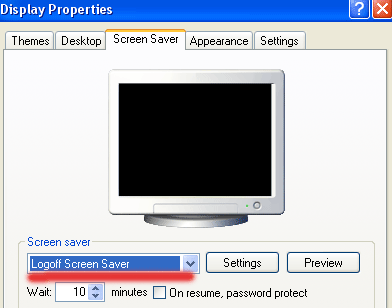
Now click on Setting button, again a small dialog box will appear with the title "WinExit Setup Dialog"

Here select the "Force application termination" check box under the "Force logoff" area
and type the number of seconds in "Countdown for n seconds" box under Time to logoff area.

Now type the message that appears during the logoff countdown timer in the "Logoff Message" box
and click on Ok button.

Click on "Preview" button to verify the settings.
Here a small dialog box will appear with the title "Auto logoff in progress", it displays the countdown
timer and logoff message.

Click on Cancel then Ok button to finish the Process.

It is very easy and interesting to change the name of Recycle Bin of your system.
Follow these Below Steps to do it:
- First click on Start button > click on Run option.
- Type here regedit.exe and press enter then you will find there regedit editor.
- In regedit editor you will open HKEY_CLASSES_ROOT folder, In this folder open the CLSID folder then open the {645FF040-5081-101B-9F08-00AA002F954E} folder >ShellFolder folder at last.
- Here simply change the data value from "40 01 00 20" to "70 01 00 20".

Laptop manufactures gives you the guarantee about the battery that how long it works. The battery of laptop always stops working very early at some stage in essential research, just like when you are watching a DVD movie.
Follow the few steps to increase the laptop battery's life: Lower the backlighting on your screen.
The screen of your Laptop takes up significant amount of power and you do not require its maximum brightness. You should have to check your system and decrease the screen brightness it to a comfortable point.
Stop your wireless signal when you are not using.
After turning off your Laptop can save max. 20 minutes of your laptop's battery time because WiFi can use a considerable quantity of power. By right clicking you can stop your WiFi signal when you are not using.

Manage the correct power scheme in XP
Windows XP contain a number of predetermined power plans, which control settings like how rapidly your laptop turns off and when your screen saver boots in. You can change your laptop power scheme by choosing Control Panel > Power Options. For max. Battery life from the "Power scheme" chooses the option "Max. Battery" and decline the list. There are good choices for you just like "Low Power Mode" and Portable /Laptop. They don't conserve as much power as Max Battery. After selecting a power scheme you click Ok button to finish the process.


You can enable this option to run windows update automatically when your computer will be connected to the internet. Through this service you can check the Microsoft website for downloadable improvements to the operating system and security patches also. These latest updates will protect your computer from the attacks of latest viruses and potential hackers. Windows Update is free of cost and important service that is why always makes sure its running on your computer.
Follow the given steps to enable this important feature on your computer:
To use this feature, you will need to be logged into your computer with administrative rights.
Click Start button and go to Settings then click on Control Panel option. Now system will open the Control Panel windows with different categories.

Just click on System option, a small System Properties dialog box will appear with many options like System Restore, Remote and Automatic Updates and others.

Click on Automatic Updates tab, if it is not selected already then click on “Automatic (recommended)” box. Then this will display the different setting to continually check Microsoft’s website for updates.

Here you can pick a download and installation schedule or select the option “Download the updates automatically and notify me when they are ready to be installed” in the section of settings. Through this option you can download updates automatically and it will install the updates immediately.
If you wait a day or two before installing an updates to make sure there are not any serious bugs reported about the latest patch you can check it through Microsoft website. Now click on Ok button to finish the process.

Today tip will help you to enjoy the quick and easy way to find lost files on your computer. Here I recommends you, try to search a file with its file extensions (for example for word file, type *.doc, Excel *.xls, Acrobat *.pdf, *.ppt and *.exe for executable files. If you don't know the name of file but know that it contains a string of text then try to search for files containing specific text, type the text you want to find from any file or folder. This is time taking process but creates very precise result. In Look in, click the drive, folder, or network you want to search. To save time, always select the specified drive or location instead of whole computer.

Click Start Button, point to Search, and then click For File or Folders, a Search Results dialog box will appear. In Search for files or folders named, type the file name or folder name you want to find in containing text.
To specify additional search criteria, click Search Options, and then click one or more of the following options to narrow your search:
- Select Date to look for files that were created or modified on or between specific dates.
- Select Type to look for files of a specific type, such as a text or WordPad document.
- Select Size to look for files of a specific size.
- Select Advanced Options to specify additional search criteria.
- Click Search now.


Google Search Launches It's New Scientific Calculator in the Search Results. Before today, when you typed an equation into Google - say, "15 x 7" — the answer (105) would appear in bold above you actual search results.
Now Google has gone one step further, giving you your answer on a virtual calculator. The blue-hued calculator appears above your results, as before, and has 34 buttons, including standard trigonometric functions, exponents and buttons for the transcendental numbers, pi and e. It also works on mobile. In Mashable Team's quick test, it appeared in both Safari and Chrome on iOS and of course on Android as well. Although the scientific functions aren’t visible in portrait mode, they appear when you flip your phone to landscape - a trick Google’s borrowing from the iOS-standard calculator.
Punching buttons is a little unwieldy in the desktop browser, but it’s natural as can be on a phone. Plus, on both versions, you can do calculations via voice search. The voice interface can even discern such phrasing as “cosine of 60 degrees.”
Source : Mashable


Bigrock Discount Coupons High Range 50%off
BigRock Announces It's Ever Before Discount Offer Valid for Limited Period for those Who want to Make a New Own Website with Unlimited Features. Now Get Flat 40% off on Web Hosting! Not applicable on Email and Reseller hosting Only on Bigrock. Use the Coupon Code BIGWEB40 While Purchasing Your Webhosting Plans in Bigrock.

Trick to Stop or Disable the Ads in Youtube While Playing an Video.
It's Impossible to Stop the Ads in Youtube but You can Try the Alternate Method to Watch Videos without Ads and Enjoying the Online Video Sessions. A Firefox extension TubeStop was created to keep YouTube videos from automatically playing on the video-sharing site. A great side effect of TubeStop has been the removal of the new ads on YouTube clips.
How this will work : TubeStop replaces YouTube’s native player on the site with the embeddable version, which has not been ad-ified yet. So get the TubeStop extension now, and you’ll be prepared for when Google starts rolling ads on YouTube again.

Too many Failed files, playing will stop now Error Resolved Solution
The Reasons Would Be :
- more than 5-10 files in a row can't be played.
- no such files actually exist on sd card (files or folder were moved somewhere else, deleted outside of Poweramp, etc.). Folders Rescan will fix that
- sd card is unmounted (e.g. phone is connected as usb storage)
- given files are not in Poweramp supported format
- files can't be read (sd card is broken, files were not downloaded completely, etc.)
Actually My Mobile had 4th Issue (given files are not in Poweramp supported format). After I Checked in My End I had Some Files and Images in MusicFolders.
Issue will be Resolved When Users of PowerAMP Must Ensure that There Should not be Any Other Formats Files Except MP3 Files.

It's Windows reimagined and reinvented from a solid core of Windows 7 speed and reliability. It's an all-new touch interface. It's a new Windows for new devices. And it's easy to try now—whether you're installing it for the first time, or moving from Windows 8 Consumer Preview.
I Have Tried The Preview Version and it's Simply Cool and didn't Expected Windows Will Come with like this Experiment. Have a Look at Official Website of Windows 8 and Try it Now.
Click Here to Visit and Download from Windows 8 Website.

Some times Some websites banned by Government, ISP and may be by your office network administrator.
This Tricks are very useful, if you are using internet particularly in school, college and office.
Follow any of the Below Tricks to Enable or to Access the Websites :
Trick 1: Search the banned website, for example www.example.com in Google and yahoo search engine then open the cached copy of that page to access the website. You can get also cache link of that website, if you search in Google with keyword cache:URL name and get cache link to access the website.
Trick 2: Another method to access the banned website using its IP address, because you can open the website with IP address instead of actual URL name. This Trick bypasses the URL based restrictions. For example if www.example.com is banned in your school, you can open it using IP address 216.178.32.51. You can search online IP conversion tools to get IP address of any website.
Trick 3: There are some mini web browsers can help you to open the banned websites, for example Opera Mini Browser, install it and try to open any banned website. Another Real Player browser can successfully help you to access the banned website. This Real Player browser bypasses the many restrictions of website banned tools.
Trick 4: There any many websites Anonymizer tools are available to fetch the banned website. These anonymous surfing tools that protect your identity on the internet and give the access to banned sites. As far as the service provider is concerned you are viewing a page from Anonymizer and not the blocked site.

Now You can insert the YouTube Videos into your PowerPoint slides to express your idea or better way to communicate something. You can convey these ideas in more effective ways, if you are using movie files with your simple slides.
Follow the given steps to add YouTube Videos into your PowerPoint slides:
First of all download the YouTube.com Videos and then save on your computer hard drive. Mostly movies are available in flash video file format on YouTube site.
You can convert also the downloaded Videos from YouTube into any common format, for example, windows media video file (wmv), windows video file (avi) and movie file (mpeg).
Tip : You can Use the KeepVid Program to Download the Youtube Videos.
First of all open the presentation in which you want to insert movie file.
Now click on "Movies and Sounds" option from the Insert" menu and choose the option "Movie from File".

Now select your movie that you want to insert into slide and click on Ok button.

Here now you are asked "Do you want your movie to play automatically in the slide show? If not, it will play when you click it."

Recommend choosing Ok button to play automatically even if you want the movie to play when clicked.
Finally save your PowerPoint presentation and run it for test.
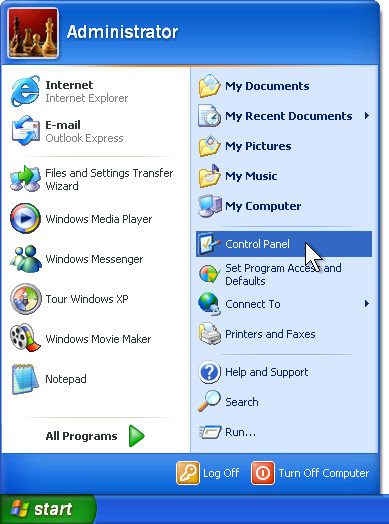
Usually Sometimes You will be Unable to Open the Control Panel if the Virus Security blocks the Registry.
The Below Post may be Useful to you to Enable it 2nd Time in System.
Different antivirus and firewall programs are used to manage the security of the computer. Some times this is build-in antivirus or firewall program in windows XP to maintain the computer security.
But if your windows is not provided with any antivirus, firewall program and Automatic Updates, your windows security center will alerts you a message "Your computer may be at risk. Your virus protection status is unknown" with useless repeating reminder.
You can disable this message permanently by changing the values of “AntiVirusDisableNotify” in windows registry.
Follow the given steps to edit the computer registry for disable message:
- First click on Start button then type Regedit in Run option.
- Here locate the location to: · HKEY_LOCAL_MACHINE\SOFTWARE\Microsoft\Security Center
- Here in right side panel, double click on AntiVirusDisableNotify and set its value 1.
- Finally Close All Programs and Re-Start Your System to Check the Effects.